
Sep 29th, 2026 | Event Management
How to Plan a Corporate Town Hall Event in Ireland
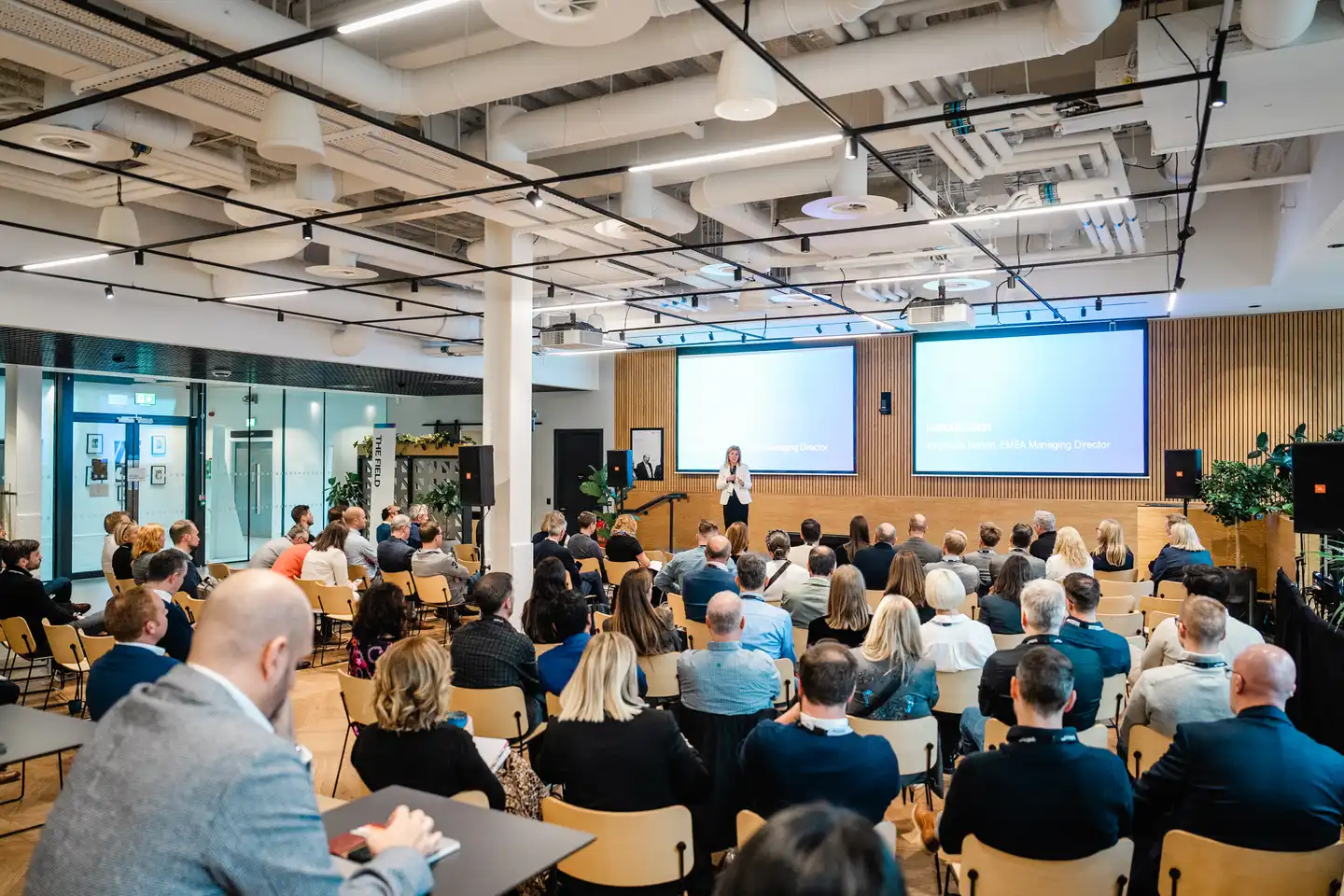
Been tasked with organising a company town hall? From finding a suitable venue and coordinating speakers to managing AV and remote attendees, there's plenty to consider. Here's how to plan a corporate town hall that runs smoothly, whether you're hosting it in your office or at an external venue.
Start with What Your Town Hall Needs to Achieve
Before booking a venue or arranging AV equipment, be clear about why you're bringing everyone together.
Are you sharing quarterly results, outlining company priorities, introducing new leadership or communicating changes across the business?
The purpose of the event will influence the agenda, the speakers involved and how much time you need for employee questions.
You should also establish who needs to attend and where they're based. A town hall for employees in one Dublin office will have different requirements from an event connecting teams across Ireland or internationally.
Agree on the main messages, audience and format before getting into the practical arrangements.
If you're organising a company event for the first time, our corporate event management guide covers the wider planning process.
Should You Host Your Town Hall in the Office or at an External Venue?
One of the first decisions you'll face is where to hold the event.
Using your own office can be convenient, particularly if most employees are based there. But a canteen, meeting room or open-plan space may need some work before it's suitable for a company-wide presentation.
Before committing to an office-based event, check:
- Capacity: Can everyone be seated comfortably with a clear view of the speakers?
- Sound: Will employees at the back of the room be able to hear presentations and questions?
- Connectivity: Is the internet connection reliable enough for livestreaming or remote speakers?
- Production space: Is there room for staging, screens, cameras and technical equipment?
- Access: Can equipment be delivered and set up without disrupting normal office operations?
- Accessibility: Can everyone access the space and participate comfortably?
An external venue may be a better option if your office can't accommodate the audience or technical requirements.
When comparing venues, look beyond the number of people the room can hold. Ask about acoustics, power supply, internet connectivity, setup access and any restrictions on bringing in staging or AV equipment.
These details are much easier to resolve before you've confirmed the booking.
If you're planning a larger event with multiple speakers or a more involved programme, the venue and production requirements may be similar to those of corporate conferences and meetings.
Real Example: Transforming the Qualtrics Dublin Office
A good example of what's possible with an existing office space is a corporate event Dynamic Events managed for Qualtrics in Dublin.
The event was held in the company's canteen, which needed to be transformed into a professional presentation venue for 80 attendees.
Dynamic Events arranged staging, a branded backdrop, AV equipment and on-site event management.
Setup began at 9am, followed by a midday rehearsal with the Managing Director and four additional speakers. The event itself started at 2pm.
The team also accommodated a last-minute request for a photographer.
Although this was a corporate presentation event rather than a town hall, many of the planning requirements are the same.
The space needed to accommodate an audience, provide a suitable setting for senior speakers and support a programme involving several presentations.
It shows that you don't necessarily need to leave your office to host a professionally managed corporate event.
Read the Qualtrics corporate event case study.
Work Out Your AV Requirements Before Finalising the Venue
AV is one of the areas where it's worth getting the details right early.
The equipment you'll need depends on the size of the audience, the number of speakers and how the event will run.
A short leadership presentation may only require microphones, screens and basic lighting. A larger town hall involving several speakers, video content, audience questions or remote attendees will need more planning.
Before confirming the technical setup, establish:
- How many speakers will need microphones?
- Will presentations include video or audio?
- Does the room need one screen or several?
- Will speakers present from a stage, lectern or panel seating?
- Will employees ask questions from the audience?
- Does the event need to be recorded or livestreamed?
- Will any speakers join remotely?
- How much time is available for setup and testing?
Ask speakers to submit their presentation files ahead of the event.
This gives the technical team time to check formatting, test videos and make sure everything displays correctly.
It's also worth deciding who will control the presentations during the event. Having one person manage slides and video playback can avoid delays between speakers.
Make Sure Hybrid Town Halls Work for Everyone
If employees are joining remotely, think about their experience as carefully as you would the people attending in person.
A camera pointed at the stage might allow someone to watch the event, but that doesn't necessarily mean they can follow everything or take part.
Consider what happens when a presenter refers to a slide or someone in the room asks a question.
Will remote employees be able to see the presentation clearly? Will they hear the question? Can they ask one themselves?
For a hybrid town hall, confirm:
- Which platform employees will use to join
- How speakers and presentation slides will appear online
- How questions from the room will be picked up by microphones
- How remote employees can submit questions
- Whether any presenters will join remotely
- Who will monitor the online session during the event
If you're connecting several offices, each location should test its equipment and internet connection beforehand.
During rehearsals, have someone join remotely to check what they can see and hear. It's a straightforward way to identify problems that might not be obvious to the team in the room.
Plan How Employee Questions Will Be Managed
For many employees, the opportunity to hear directly from leadership and ask questions is an important reason to attend a town hall.
Don't leave the Q&A until the final few minutes and hope there's enough time.
Decide beforehand how questions will be collected.
At a smaller event, employees may be comfortable asking questions directly from the room.
For a larger audience, a moderator and dedicated microphones can make the session easier to manage.
If employees are joining remotely, make sure they have a way to submit questions too.
You could also invite employees to send questions in advance, particularly if the event involves major company announcements.
This gives the moderator time to organise the questions and identify topics that may need more detailed answers.
If you can't get through every question during the event, agree how the remaining questions will be addressed afterwards.
Don't Underestimate Setup and Rehearsal Time
Your town hall might only last an hour or two, but the preparation can take considerably longer.
Staging, screens, microphones, lighting and cameras all need to be installed and tested before employees arrive.
If you're using your own office, setup may need to happen around normal working hours.
Confirm when the event team can access the space and allow enough time for installation, technical checks and speaker rehearsals.
A rehearsal should cover more than clicking through the slides.
Make sure:
- Speakers know where to stand and which microphone to use.
- Presentations, videos and audio play correctly.
- Transitions between speakers are clear.
- Remote presenters can connect without difficulty.
- The moderator understands how the Q&A will work.
- Everyone involved has the latest running order.
It's also worth thinking through what could change on the day.
A speaker might be delayed, a presentation may need updating or a remote connection could drop.
Having someone responsible for managing those situations means the programme can be adjusted without leaving speakers or attendees wondering what's happening.
Keep Registration and On-Site Logistics Organised
The level of event administration you'll need depends on the size and format of your town hall.
A smaller event in your own office might only require an internal invitation and a clear schedule.
A larger event at an external venue may involve attendee registration, catering, signage, transport arrangements and check-in.
If employees are travelling from different offices, allow enough time for everyone to arrive before the programme starts.
For hybrid events, send joining instructions in advance so remote attendees know how to access the meeting and submit questions.
On the day, the event team should have a schedule covering supplier arrivals, setup, rehearsals, registration and the live programme.
Speakers, venue staff and technical personnel should also know who to contact if something changes.
Keeping these arrangements coordinated allows the presenters to concentrate on delivering their messages.
Corporate Town Hall Planning Checklist
Before finalising your event, make sure you've covered the following:
- Purpose and audience: Confirm the main messages, speakers and expected attendance.
- Event format: Decide whether the town hall will be in person, hybrid or across multiple locations.
- Venue: Check capacity, layout, accessibility, connectivity and setup access.
- AV production: Confirm microphones, screens, staging, cameras and recording requirements.
- Speakers: Finalise the agenda, presentation deadlines and rehearsal schedule.
- Employee questions: Decide how questions will be collected, moderated and answered.
- Logistics: Confirm invitations, registration, supplier schedules and on-site responsibilities.
- Contingency plans: Agree how speaker delays, technical problems and programme changes will be handled.
What Happens After the Town Hall?
Once the event is over, consider what employees might need afterwards.
This could include a recording, presentation materials, a summary of the main announcements or answers to questions that couldn't be covered during the session.
If the event was hybrid, it's worth asking remote attendees about their experience.
Could they hear the presentations clearly? Were the slides easy to follow? Did they have an opportunity to ask questions?
Their feedback can help you improve the next town hall.
Planning a Corporate Town Hall Event in Ireland?
Dynamic Events provides event management services for corporate meetings, leadership presentations and company-wide events.
We can manage the entire event or support specific requirements, including venue sourcing, staging, AV production, speaker coordination, registration and on-site management.
Whether you're hosting employees in your own office or bringing teams together at an external venue, we can help with the planning and delivery.


Oct 29th, 2026
How To Plan A Corporate Networking Event In Ireland
Planning a corporate networking event in Ireland? From client receptions and business launches to interactive entertainment and company celebrations, discover practical tips for creating an engaging event that brings people together and encourages meaningful connections.
Read more

Oct 28th, 2026
Death By PowerPoint: Energise Your Team Offsite With Dynamic Events Ireland
Still sitting through presentations that could have been an email? If your company offsite is heavy on slides, here’s how to break up the day with team building activities that get people out of their seats.
Read more

Oct 10th, 2026
How To Choose Virtual Team Building For A Large Group
Got 50, 100 or 200 people joining a virtual team event? The numbers are rarely the hardest part. Here’s what we look at when helping clients choose an activity their group will actually enjoy.
Read more

Similar Blog Posts


A Day In The Life Of The Head Of Conference & Event Management At Dynamic Events
Go behind the scenes with our Head of Conference & Event Management and learn how Dynamic Events delivers top-tier corporate events in Dublin and beyond.
Read more

A Day In The Life Of An Intern At Dynamic Events
What’s it really like to work at Dynamic Events? Our intern Taylor shares her favourite moments and lessons from six months behind the scenes.
Read more

Book Now, Celebrate Later: Planning Your Summer Corporate Event
Planning a corporate summer event in Ireland? Start with three things: where it will take place, how many people are attending and whether you already have an activity in mind.
Read more


Have a question about team building or event management,
or would you like to arrange a free demo of our
online team building activities?
We would love to hear from you.
Contact us today and we'll respond today.
Send us a message
Drop us a line
Email:
Office Address:
Unit 8 Burgage House,
Blessington, Co.Wicklow.
Follow Us


View Our Venue Partners, Locations and Event Types
